Description
You are given an image represented by an m x n grid of integers image, where image[i][j] represents the pixel value of the image. You are also given three integers sr, sc, and color. Your task is to perform a flood fill on the image starting from the pixel image[sr][sc].
To perform a flood fill:
- Begin with the starting pixel and change its color to
color. - Perform the same process for each pixel that is directly adjacent (pixels that share a side with the original pixel, either horizontally or vertically) and shares the same color as the starting pixel.
- Keep repeating this process by checking neighboring pixels of the updated pixels and modifying their color if it matches the original color of the starting pixel.
- The process stops when there are no more adjacent pixels of the original color to update.
Return the modified image after performing the flood fill.
Example 1:
Input: image = [[1,1,1],[1,1,0],[1,0,1]], sr = 1, sc = 1, color = 2
Output: [[2,2,2],[2,2,0],[2,0,1]]
Explanation:
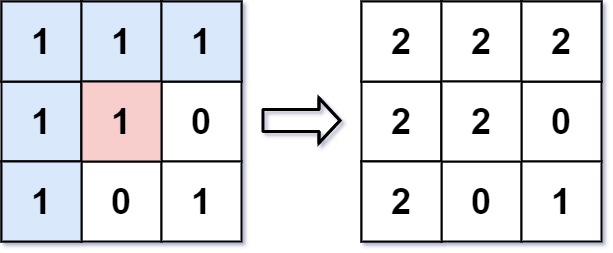
From the center of the image with position (sr, sc) = (1, 1) (i.e., the red pixel), all pixels connected by a path of the same color as the starting pixel (i.e., the blue pixels) are colored with the new color.
Note the bottom corner is not colored 2, because it is not horizontally or vertically connected to the starting pixel.
Example 2:
Input: image = [[0,0,0],[0,0,0]], sr = 0, sc = 0, color = 0
Output: [[0,0,0],[0,0,0]]
Explanation:
The starting pixel is already colored with 0, which is the same as the target color. Therefore, no changes are made to the image.
Constraints:
m == image.lengthn == image[i].length1 <= m, n <= 500 <= image[i][j], color < 2160 <= sr < m0 <= sc < n
Primary Approach: Depth-First Search (DFS) ( Time, Space)
Intuition
Flood fill is a graph traversal problem where connected grid cells of the same initial color represent a connected component:
- Record the starting color
initialColor = image[sr][sc]. - Critical Edge Case: If
initialColor == color, no work is needed—returnimageimmediately to prevent infinite recursion/stack overflow. - Perform DFS starting at
(sr, sc): repaint current cell tocolor, then recursively visit all 4-directional neighbors (up, down, left, right) that matchinitialColor.
class Solution {
    public int[][] floodFill(int[][] image, int sr, int sc, int color) {
        int initialColor = image[sr][sc];

        // Edge case: target color is identical to starting color
        if (initialColor != color) {
            dfs(image, sr, sc, initialColor, color);
        }

        return image;
    }

    private void dfs(int[][] image, int r, int c, int initialColor, int newColor) {
        // Boundary checks and color matching check
        if (r < 0 || r >= image.length || c < 0 || c >= image[0].length || image[r][c] != initialColor) {
            return;
        }

        // Repaint pixel
        image[r][c] = newColor;

        // Recurse 4-directionally
        dfs(image, r + 1, c, initialColor, newColor);
        dfs(image, r - 1, c, initialColor, newColor);
        dfs(image, r, c + 1, initialColor, newColor);
        dfs(image, r, c - 1, initialColor, newColor);
    }
}
Complexity
- Time Complexity: — In the worst case, every pixel in an grid is visited once.
- Space Complexity: — Recursion call stack can go up to deep in a fully connected matrix.
Alternative Approach: Breadth-First Search (BFS) ( Time, Space)
Intuition
Traverse the matrix level-by-level using an explicit Queue:
- Check if
initialColor == color. If so, return early. - Push
{sr, sc}into aQueueand update its color immediately tocolor(marking it visited). - Poll nodes from the queue, inspect their 4-directional neighbors, and push any neighbor matching
initialColorinto the queue after updating its color.
import java.util.ArrayDeque;
import java.util.Queue;

class Solution {
    public int[][] floodFill(int[][] image, int sr, int sc, int color) {
        int initialColor = image[sr][sc];
        if (initialColor == color) return image;

        int m = image.length;
        int n = image[0].length;
        int[][] directions = {{1, 0}, {-1, 0}, {0, 1}, {0, -1}};

        Queue<int[]> queue = new ArrayDeque<>();
        queue.add(new int[]{sr, sc});
        image[sr][sc] = color; // Mark as visited by updating color

        while (!queue.isEmpty()) {
            int[] curr = queue.poll();
            int r = curr[0];
            int c = curr[1];

            for (int[] dir : directions) {
                int nr = r + dir[0];
                int nc = c + dir[1];

                if (nr >= 0 && nr < m && nc >= 0 && nc < n && image[nr][nc] == initialColor) {
                    image[nr][nc] = color;
                    queue.add(new int[]{nr, nc});
                }
            }
        }

        return image;
    }
}
Complexity
- Time Complexity: — Each pixel is queued and processed at most once.
- Space Complexity: — Queue stores at most elements in memory.
Key Interview Discussion Points
- Infinite Recursion / Cycle Trap: Always point out the edge case where
initialColor == color. Without checkinginitialColor != color,dfswill re-process the start node infinitely becauseimage[r][c] == initialColorwill continuously evaluate totrue. - In-Place Modification: Modifying
imagedirectly serves dual purposes: completing the recoloring task and acting as an implicitvisitedarray (since modified pixels no longer equalinitialColor).
Easy Memory Rule
“Same color target? Return early Otherwise DFS/BFS 4-directionally and repaint matching pixels in-place!”